Check if PDF is PDF/A
Abstract
There is often the need to submit a PDF/A to an online form. Most office suites have a way to export to a PDF that cplies with the PDF/A standards (yes, plural!), but it is often hidden somewhere or the user may forget how the have created that. Also none of these office suites let the user to choose which standard they want to have. In this blog post I'm writing the ultimate solution I found after a lot of trial and error with various software, to validate if a given PDF file is complient or not, and if it is, which version of PDF/A.
First off, let's briefly explain what PDF/A is and is not. Unlike some common beliefs, the A in PDF/A stands for Archive and not Accessibility. This is a an ISO version of PDF specification that was first publihsed in 2025-09.28 under the standard name ISO 19005-1, and then was improved and revised 3 more time (at least until now that I'm wrigint this blog post). Ironically enough, you can view the PDF/A standard as PDF in here from Adobe that itself is NOT following the PDF/A standard! Conveniently, I will use this file throughout this blog post as negative example.
If Adobe at some point changed the file, you can always access the file in Web Archive
❯  sha256sum PDF_ISO_32000-2.pdf
605796798c2bf73f55a1a63e3cb8d9a45001864417050b6f36b3b5735d6bd63d  PDF_ISO_32000-2.pdf
Now that we have a nagative example, let's create a positive example as well.
There are a ton of software online that claim that they can validate PDF/A, and they almost all cost you money. But there is a Free and Libre OpenSource Software (FLOSS) tool that does the job and does it perfectly. The software name is veraPDF and is Developed and released by the veraPDF Consortium and funded by the PREFORMA project.
As a side-note, the PREFORMA project full name is "PREservation FORMAts for culture information/e-archives" which is an EU project and you can read more about it here and here. I strongly recommend exploring this project.
I first found veraPDF in the Wikipedia article about PDF/A which unfortunately has this false statement:
veraPDF is available for installation on Windows, macOS, or Linux using a PDFBox-based or "Greenfields" PDF parser.
This send me through a rabbithole of Apache PDFBox, and that was unpleasant because I really don't like to deal with Java tools that are written god knows when with minimal explanation and some scattered .jar files with vague names! Alas, I'm writing this to say that ignore Apache and go with the actual veraPDF official software!
Install veraPDF
Now, let's install the veraPDF and giving it a go:
- Go to this link and download for Linux: https://verapdf.org/software/
or
cd ~/Downloads wget https://software.verapdf.org/rel/verapdf-installer.zip - extract the zip file
This would create a folder likeunzip verapdf-installer.zipverapdf-greenfield-1.30.1. - run the installer
cd verapdf-greenfield-* java -jar verapdf-izpack-installer-*.jar - Follow installation steps in the GUI
Running
After the installation, cd to the folder that you installed veraPDF in and you should see two executable files: verapdf and verapdf-gui. The former is CLI and the latter is GUI application.
❯  ls -alh
total 52K
drwxr-xr-x  7 mehrad mehrad 4.0K May 20 16:38 ./
drwxr-xr-x 36 mehrad mehrad 4.0K May 20 16:35 ../
drwxr-xr-x  2 mehrad mehrad 4.0K May 20 16:10 bin/
drwxr-xr-x  2 mehrad mehrad 4.0K May 20 16:11 config/
drwxr-xr-x  2 mehrad mehrad 4.0K May 20 16:10 documents/
-rw-r--r--  1 mehrad mehrad 4.9K May 20 16:10 .installationinformation
drwxr-xr-x 12 mehrad mehrad 4.0K May 20 16:10 plugins/
-rw-r--r--  1 mehrad mehrad  988 May 20 16:38 README.org
drwxr-xr-x  2 mehrad mehrad 4.0K May 20 16:11 Uninstaller/
-rwxr-xr-x  1 mehrad mehrad 3.8K May 20 16:10 verapdf
-rwxr-xr-x  1 mehrad mehrad 4.4K May 20 16:10 verapdf-gui
GUI
If you run the verapdf-gui the graphical window will open. On KDE Plasma v6.6.5 the GUI window opened outside of my monitor and it was hard to pull it in the view. The trick that worked was to right-click on the application icon in Plasma toolbar, then More > Move and drag the mouse.
If we use our negative test file, we will get this error:
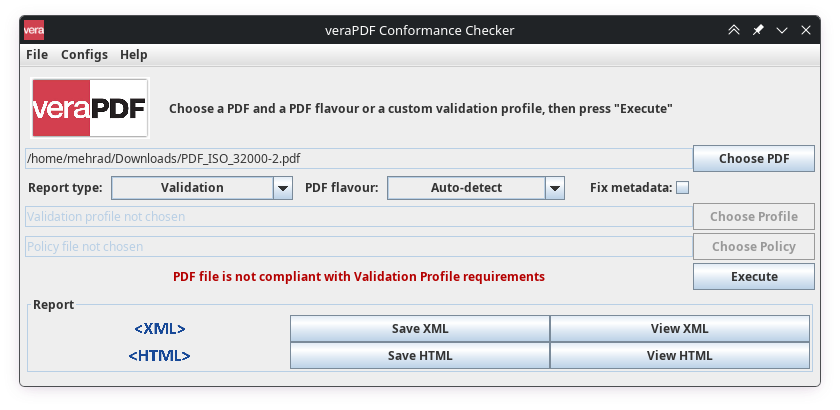
The veraPDF can also produce a HTML or PDF report for this, which you can click here.
CLI
We can also use the CLI form of veraPDF for this:
cd /tmp
wget https://developer.adobe.com/document-services/docs/assets/5b15559b96303194340b99820d3a70fa/PDF_ISO_32000-2.pdf
./verapdf PDF_ISO_32000-2.pdf \
| grep --perl-regexp \
       --only-matching '(?<=check status=")[^"]+' \
| sort \
| uniq -c
which we will get:
232 failed